
Circle Text Generator
Put Text in a Circle Online
Type your words, pick the circle layout, and watch your text wrap perfectly around a circle. Export a transparent PNG ready for logos, badges, stamps & more.
- Perfect circular layout
- Works on phone & desktop
- Transparent PNG export
What Is a Circle Text Generator?
A circle text generator is an online tool that arranges your text along a perfect circular path, so every letter curves smoothly around the ring. Designers use circular text for logos, emblems, stamps, badges, and social-media graphics where text needs to wrap neatly around a central icon or image. With CurvedTextMaker you can draw a circle freehand, fine-tune the radius, choose any font and color, then export a high-resolution transparent PNG — all in seconds, right in your browser, completely free.
How to Make Text in a Circle
Create perfect circular text in under a minute. Draw, customize, and export — no design skills required.
Draw a Circle Path
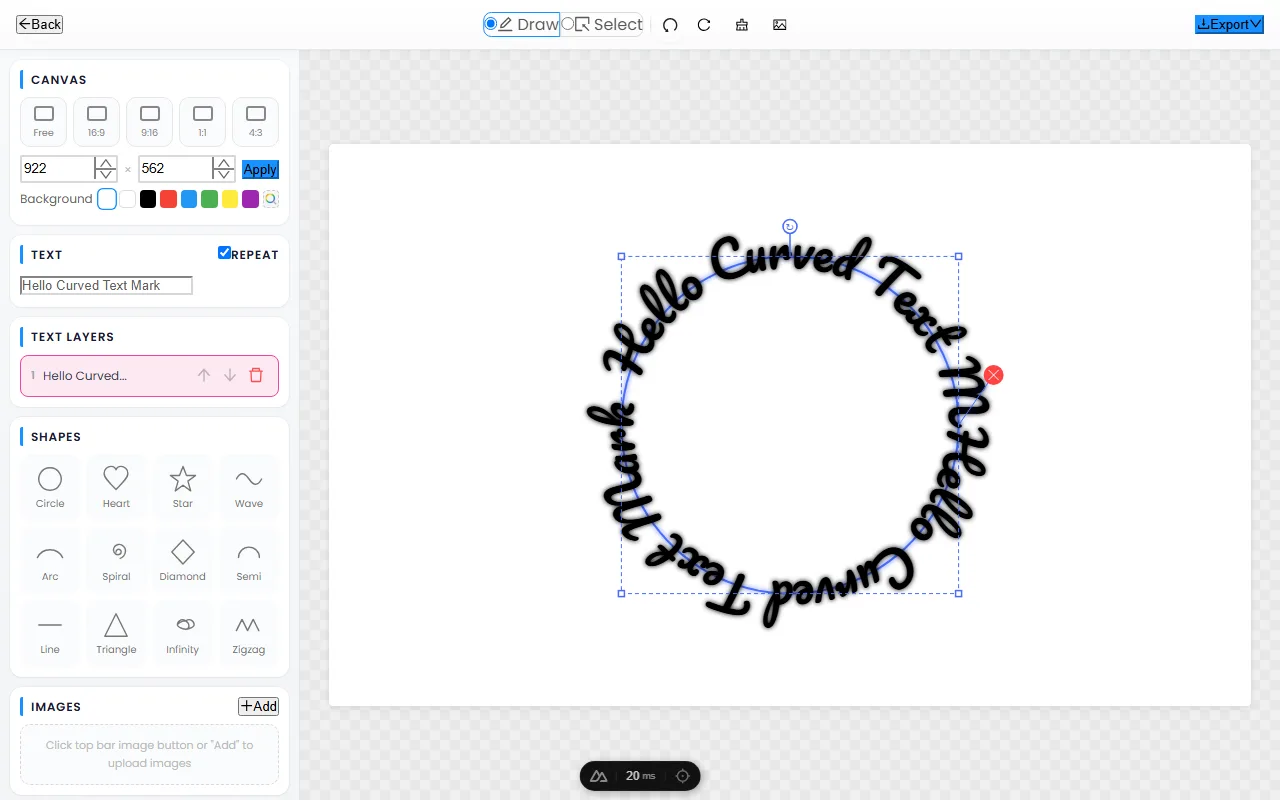
Open the editor and click-drag on the canvas to draw a circle. Your text instantly wraps around the path in real time — adjust the size until it looks right.
Customize Font & Style
Pick from dozens of fonts, adjust text size and letter spacing, choose any color, and add shadow effects. Change the background or keep it transparent for maximum flexibility.
Export Transparent PNG
Click "Export Text" to download a high-resolution PNG with a transparent background. Drop it onto any image, video, poster, or presentation — it blends in perfectly every time.
The Best Free Circle Text Generator
A powerful text-in-circle tool that works right in your browser — no downloads, no accounts, no limits.
Perfect Circle Layout — Every Time
Unlike tools that distort letters or leave uneven spacing, CurvedTextMaker calculates the optimal arc length for each character, giving you crisp, professional circular text with consistent spacing all the way around.
Works on Every Device
Our circle text generator is fully responsive and works seamlessly on desktops, tablets, and smartphones. Use your finger on mobile to draw circle paths just as easily as a mouse on desktop.
Transparent PNG — Drag & Drop Ready
Every exported image has a transparent background by default. Overlay your circle text onto photos, videos, logos, or any creative project without extra editing. What you see is what you get.
Circle Text: Uses, Fonts & Pro Tips
Circle text is more than a decorative flourish — it is the layout behind badges, seals, stamps, coins, and some of the world’s most recognizable logos. This guide covers where circular text earns its place, the top-and-bottom badge trick, how to choose fonts that survive the curve, and the mistakes that make circle text look amateur.
Where circle text works best
Circle text shines wherever a design needs to feel official, crafted, or complete in itself. The classic use cases:
- Badges & seals — the ring of small text around a central icon is the universal language of artisan and small-batch branding.
- Stamps & wax seals — circular text frames a monogram or date perfectly for wedding stationery and packaging.
- Coins, tokens & medals — the format literally comes from currency, so it reads as valuable and permanent.
- Logo lockups — wrapping a tagline around a central mark creates a self-contained emblem that scales from a favicon to a billboard.
- Social profile art — circular avatars and story covers use text-in-a-ring to stay legible inside a round crop.
The top-and-bottom badge trick
The badge look you recognize is not one piece of curved text — it is two. The top arc reads left-to-right along the upper curve; the bottom arc is flipped so it also reads left-to-right along the lower curve, instead of turning upside-down. Together they form a complete ring around the central icon.
To build it: curve one text layer along the top of the circle, then add a second layer along the bottom and flip it so the letters stay upright when read. Most badge designs also separate the two halves with a small dot, star, or diamond at the three and nine o’clock positions — those tiny dividers are what make the layout read as official.
Choosing fonts for circular text
Not every font survives being bent around a ring. The guidelines that actually matter:
- Use even-weight sans-serifs. Geometric and humanist sans-serifs with a uniform stroke keep their proportions on a curve. Heavy contrast between thick and thin strokes looks elegant on a straight line but falls apart on a tight circle.
- Avoid thin or decorative scripts on small circles. Fine hairlines disappear at small sizes, and ornate scripts collide with their neighbors on the inner edge.
- Prefer slightly condensed faces for longer text. Condensed letters fit more characters around the ring without crowding.
- Match weight to circle size. Larger circles carry heavier weights; small badges need lighter, tighter type.
Common mistakes (and how to avoid them)
Three issues cause almost every off-looking piece of circle text:
- Uneven letter spacing. Letters compress along the inner edge of the curve, so a gap that looks right on a straight baseline looks pinched on a circle. Open the letter spacing a touch — especially near the bottom — and increase the radius if it still feels tight.
- Inner crowding on small radii. The smaller the circle, the more the inner letters squash together. If text piles up, enlarge the circle or shorten the phrase.
- Too much text. A circle holds far fewer words than a line. One short phrase reads as confident; a full sentence reads as cluttered. If you need more words, split them into the top-and-bottom two-layer layout above.
Get the radius, spacing, and length right, and your circle text will look like it came from a design studio — not a generator.
Frequently Asked Questions
Open CurvedTextMaker, type your text, then draw a circle path on the canvas. Your text wraps around the circle instantly. Customize the font, size, color, and spacing, then export a transparent PNG.
Yes — CurvedTextMaker is 100% free with no hidden costs, no sign-up, and no watermarks. All features are available at no charge, including multiple fonts, colors, and high-resolution transparent PNG exports.
Absolutely. Circular text is one of the most popular logo styles worldwide. Create text that wraps around a central icon, export it as a transparent PNG, and drop it into any design tool or document.
All exports are high-resolution transparent PNG files. This means you can overlay your circular text onto any photo, video, or design without a background getting in the way.