Wave Text Generator
Create Wavy Text Online Free
Turn any text into playful wavy designs with a single click. Adjust the wave height and frequency, pick your style, then export a transparent PNG — perfect for social posts, logos & more.
- Endless wave styles
- Works on phone & desktop
- Transparent PNG export
What Is a Wave Text Generator?
A wave text generator is an online tool that bends your text along a smooth wavy path, creating a flowing, undulating effect. Wavy text is popular on social media, in brand designs, on event posters, and anywhere you want to add a playful or dynamic feel. With CurvedTextMaker you simply draw a wave freehand, fine-tune the amplitude and wavelength, choose any font and color, then export a high-resolution transparent PNG — all in your browser, completely free.
How to Make Wavy Text
Create eye-catching wavy text in under a minute. Draw, customize, and export — no design skills required.
Draw a Wave Path
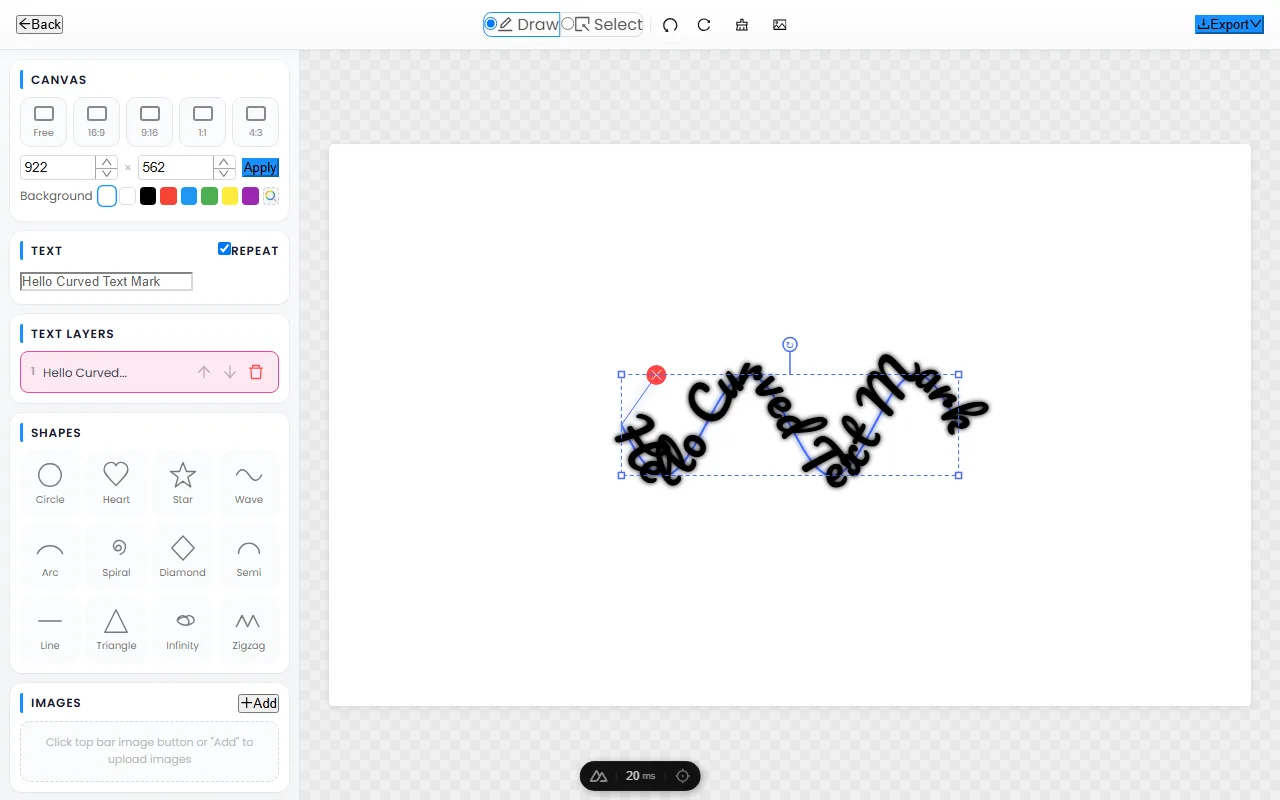
Open the editor and click-drag on the canvas to draw a wavy line. Your text follows the wave in real time — make it gentle or dramatic, whatever suits your design.
Customize Font & Style
Choose from dozens of fonts, tweak text size and letter spacing, pick any color, and add shadow effects. Change the background or keep it transparent for maximum flexibility.
Export Transparent PNG
Click "Export Text" to download a high-resolution PNG with a transparent background. Drop it onto any image, video, poster, or presentation — it blends in perfectly every time.
The Best Free Wave Text Generator
A powerful wavy text tool that works right in your browser — no downloads, no accounts, no limits.
Freehand Wave Paths — Not Just Presets
Unlike tools that only offer a few fixed wave templates, CurvedTextMaker lets you draw any wave shape freehand. Create gentle ripples, dramatic swells, or multi-layered waves — your text follows whatever path you draw.
Works on Every Device
Our wave text generator is fully responsive and works seamlessly on desktops, tablets, and smartphones. Use your finger on mobile to draw wave paths just as easily as a mouse on desktop.
Transparent PNG — Drag & Drop Ready
Every exported image has a transparent background by default. Overlay your wavy text onto photos, videos, logos, or any creative project without extra editing. What you see is what you get.
Wave Text: Playful, Retro & Social Designs
Wave text undulates along a flowing path, giving type a sense of motion and personality that straight lines cannot match. It is the signature look of social thumbnails, party flyers, and retro branding. This guide covers where wave text fits, how amplitude and frequency shape the feel, how to keep wavy text readable, and how to match a wave to your brand voice.
Where wave text fits
Wave text communicates energy, fun, and informality — use it where that tone is the message:
- Social media — wavy captions, story text, and reel covers stand out in a feed of straight lines.
- Event & party graphics — flyers for festivals, birthdays, and beach or summer events lean on waves for movement.
- Retro and Y2K design — the wavy, liquid look is a direct callback to 1970s and early-2000s typography trends.
- Stickers, merch & packaging — a wave turns a plain wordmark into something that feels designed for a product, not a document.
Where wave text does not fit: serious corporate communication, legal or financial content, and anywhere clarity and authority matter more than personality.
Amplitude and frequency
Two controls define every wave, and understanding them unlocks the whole effect:
- Amplitude is the height of the wave — how far the text rises and falls. High amplitude is bold and dramatic; low amplitude is subtle and sophisticated.
- Frequency is how many waves fit across the text. High frequency (many quick ups and downs) feels jittery and playful; low frequency (one slow roll) feels calm and flowing.
Match the two to the energy you want: a slow, tall wave reads as confident and summery; a quick, short wave reads as bubbly and fun. The same word can feel entirely different depending on how you tune these.
Keeping wavy text readable
The biggest mistake with wave text is pushing the amplitude so high that the reader loses the line. As letters swing further from the baseline, the eye has to work harder to track from word to word. For anything longer than a single word, keep the amplitude modest — a gentle wave stays readable while still feeling dynamic. Reserve tall, dramatic waves for short phrases, single words, or decorative accents where reading speed does not matter. Increasing the font weight also helps: bold letters hold their shape across a wave far better than thin ones, which thin out and break up on the curves.
Matching the wave to brand voice
Treat wave text as an accent, not a default. A wave signals "fun, casual, energetic," so use it on the one element where you want that feeling — a hero word, a call-to-action, a product name — and keep the supporting copy straight and quiet. Pair the wave with a confident color and a bold weight so the movement reads as intentional design rather than a typo. When a brand is playful at its core, waves can carry more weight; when a brand is serious, a single subtle wave in the right place does more than waves everywhere.
Frequently Asked Questions
Open CurvedTextMaker, type your text, then draw a wavy path on the canvas. Your text follows the wave instantly. Customize the font, size, color, and spacing, then export a transparent PNG.
Yes — CurvedTextMaker is 100% free with no hidden costs, no sign-up, and no watermarks. All features are available at no charge, including multiple fonts, colors, and high-resolution transparent PNG exports.
Absolutely. Because you draw the wave freehand, you have complete control over the wave amplitude (height) and frequency (how many waves). Draw a gentle sine wave or a dramatic zigzag — your text follows exactly.
Wavy text is great for social media graphics, event posters, album covers, brand designs, greeting cards, memes, and any creative project where you want to add movement and personality to plain text.