
Spiral Text Generator
Create Text in a Spiral Online
Turn any text into mesmerizing spiral designs with a single click. Adjust the tightness and turns, pick your font, then export a transparent PNG — perfect for logos, posters & creative projects.
- Adjustable spiral tightness
- Works on phone & desktop
- Transparent PNG export
What Is a Spiral Text Generator?
A spiral text generator is an online tool that arranges your text along a spiral path, making each letter curve inward or outward in a captivating swirl. Designers use spiral text for logos, tattoos, decorative posters, album covers, and any creative project that needs a dynamic, eye-catching text effect. With CurvedTextMaker you can draw a spiral freehand, fine-tune the number of turns and spacing, choose any font and color, then export a high-resolution transparent PNG — all in seconds, right in your browser, completely free.
How to Make Spiral Text
Create stunning spiral text in under a minute. Draw, customize, and export — no design skills required.
Draw a Spiral Path
Open the editor and click-drag on the canvas to draw a spiral. Your text wraps along the spiral in real time — adjust the tightness and number of turns until it looks perfect.
Customize Font & Style
Choose from dozens of fonts, adjust text size and letter spacing, pick any color, and add shadow effects. Change the background or keep it transparent for maximum flexibility.
Export Transparent PNG
Click "Export Text" to download a high-resolution PNG with a transparent background. Drop it onto any image, video, poster, or presentation — it blends in perfectly every time.
The Best Free Spiral Text Generator
A powerful spiral text tool that works right in your browser — no downloads, no accounts, no limits.
Freehand Spiral Paths — Full Control
Unlike tools that lock you into a few preset spirals, CurvedTextMaker lets you draw any spiral shape freehand. Create tight coils, loose swirls, or multi-turn spirals — your text follows exactly the path you draw.
Works on Every Device
Our spiral text generator is fully responsive and works seamlessly on desktops, tablets, and smartphones. Use your finger on mobile to draw spiral paths just as easily as a mouse on desktop.
Transparent PNG — Drag & Drop Ready
Every exported image has a transparent background by default. Overlay your spiral text onto photos, videos, logos, or any creative project without extra editing. What you see is what you get.
Spiral Text: Decorative Centerpieces & Mandalas
Spiral text winds along a curling path, drawing the eye inward or outward in a way no other layout can. It is an ornamental effect — closer to texture than to a headline — used for posters, mandala-style logos, album art, and tattoos. This guide covers what spiral text is for, the center-crowding problem, how to use it as an accent rather than a message, and how to make spirals look intentional.
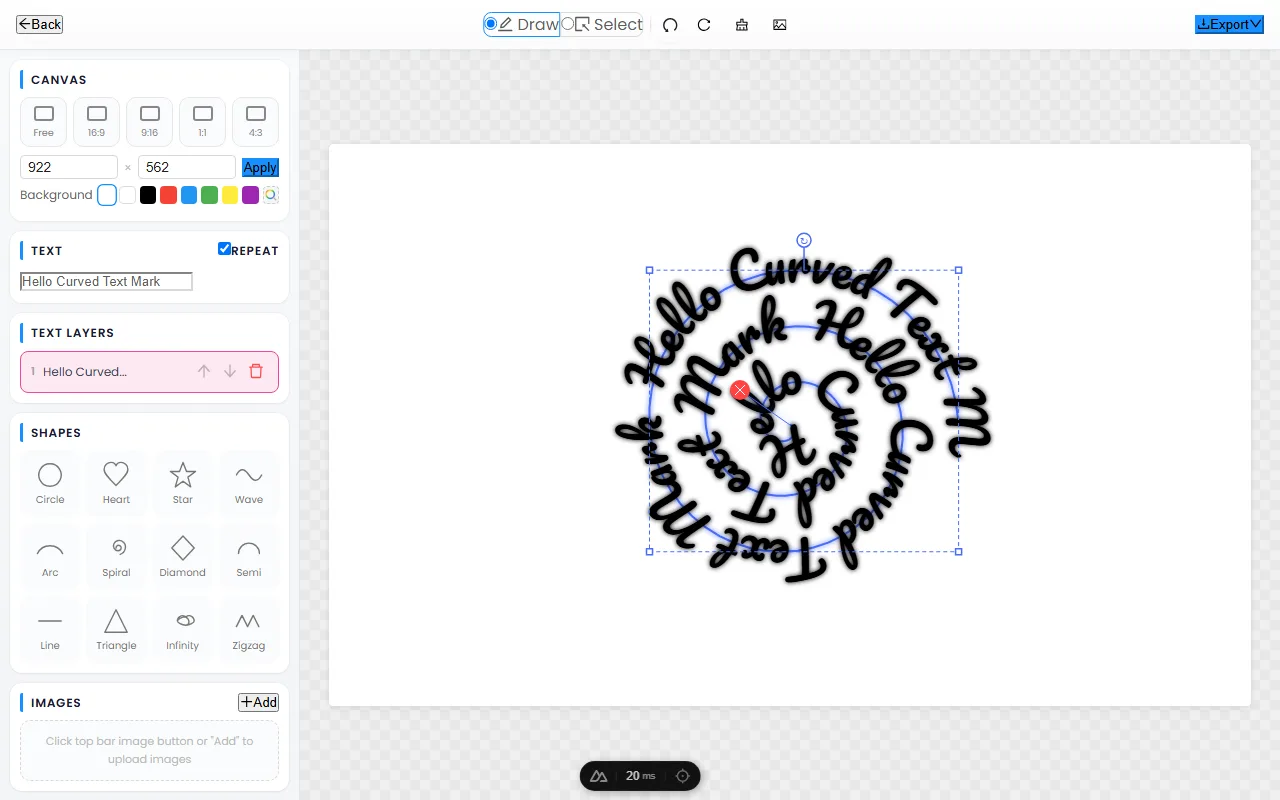
What spiral text is for
Spiral text is decoration first and reading matter second. It earns its place in designs that want to feel hypnotic, mystical, or crafted by hand:
- Posters & album art — a spiral of repeated words creates a hypnotic centerpiece that rewards a second look.
- Mandala-style logos — text winding around a central symbol reads as spiritual, artisanal, or esoteric.
- Tattoo & apparel design — spirals translate well to circular canvases like patches, coins, and skin.
- Decorative framing — a spiral can hold a short mantra, brand name, or list of ingredients as ornament around a focal element.
If the audience needs to read a sentence quickly, choose a straight or gently curved layout instead — spirals are for moments that invite lingering.
The center problem: tightness and crowding
Every spiral has a built-in challenge: as the path curls inward, the letters crowd toward the center and eventually overlap. The tighter the spiral, the faster this happens. Three habits keep spirals clean:
- Stop before the pinch. End the spiral once letters start to compress, rather than winding all the way to a point. A spiral that stops cleanly looks deliberate; one that piles up at the core looks broken.
- Leave the center for an icon. Place a small symbol, dot, or logo in the empty middle and let the text spiral out from it. This turns the awkward center into the focal point.
- Use more turns with fewer words. Repeating a short phrase around several turns reads as a pattern; cramming one long sentence into a single turn reads as a tangle.
Spiral as accent, not message
The most common mistake is treating spiral text as the primary message. Because letters tilt and shrink along the curve, a spiral is hard to read at speed — so it underperforms as a headline. The strongest designs put the actual message in straight or gently curved type, and use the spiral as a supporting ornament: a frame of repeated words, a decorative border, or a background motif. The spiral adds mood and craft; the straight text delivers the information. Together they do what neither could alone.
Making spirals look intentional
A spiral reads as designed rather than random when it follows a few rules. Repeat a short, meaningful phrase (a mantra, a brand name, a value) around the turns so the repetition becomes a pattern rather than noise. Keep letter spacing consistent all the way around, since uneven gaps are the fastest way to make a spiral look handmade in the wrong sense. Stick to a single color or a smooth gradient — rainbow effects on a spiral fight against the form and tire the eye. Finally, pair the spiral with a clean geometric element at its center: a circle, a star, or a simple icon gives the curl somewhere to resolve.
Frequently Asked Questions
Open CurvedTextMaker, type your text, then draw a spiral path on the canvas. Your text follows the spiral instantly. Customize the font, size, color, and spacing, then export a transparent PNG.
Yes — CurvedTextMaker is 100% free with no hidden costs, no sign-up, and no watermarks. All features are available at no charge, including multiple fonts, colors, and high-resolution transparent PNG exports.
Absolutely. Because you draw the spiral freehand, you have complete control over the tightness (how close the coils are) and the number of turns. Draw a tight vortex or a loose, sweeping spiral — your text follows exactly.
Spiral text is perfect for logos, tattoo designs, album covers, psychedelic posters, event flyers, social media graphics, and any creative project where you want to add a dynamic, hypnotic effect to your typography.